AI Assist & Govern: describe an integration, keep full control
Connecting two systems should start with a sentence, not a project. Episode 4 of the feature tour shows the Weldforge AI assistant capturing a build request in plain English — then the govern half: every mapping versioned, every change in the audit log.
Most integration tools make you live inside their connector catalog and learn their builder. Weldforge starts somewhere simpler: a sentence. Tell the assistant what you want connected, in plain English, and it does the scoping. This episode of the feature tour walks the two halves of that — the AI assist that captures the work, and the governance that keeps you in control once it is built.
Describe it — or start from a suggestion
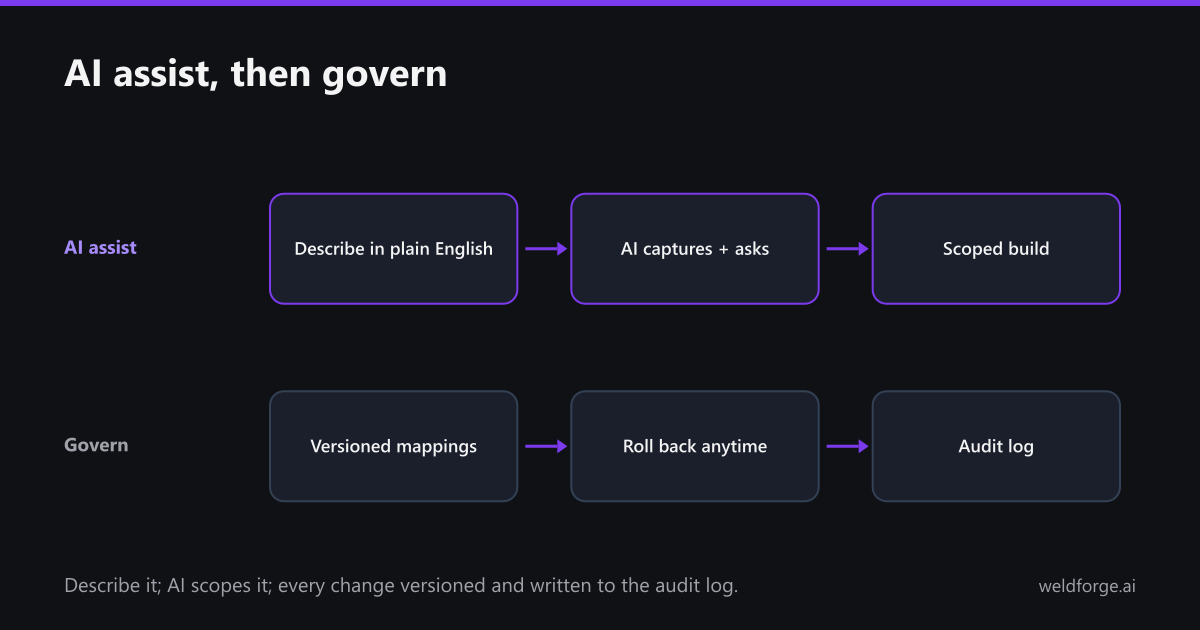
You can type the outcome ("we use Salesforce for sales and want closed-won opportunities to land in our Snowflake warehouse every 15 minutes") or start from a suggestion like "Connect Salesforce to Snowflake" or "Sync Shopify orders into NetSuite." Either way the assistant captures the build request and asks a few smart, plain-language questions — filters, renames, sample data — to pin down the scope.
Ask it anything
It is a real assistant, not a form. Ask how Weldforge differs from Zapier, or what the flat fee covers, and it answers — then gets back to scoping. You describe the outcome; it figures out the how.
Then govern it
- Versioned mappings: every save is a new version — "Mapping saved, version 1" — so you can always roll back.
- Audit log: every change is attributable and timestamped.
- Access & security: role-based control over who can touch what.
- Proactive billing: alerts at 70%, 85%, and 100% of plan; no invoice exceeds your subscription without your one-click approval.
AI does the heavy lifting on the build and the run. You keep full visibility and control. That is the whole idea: tell us what to connect, we build it, flat fee.