How to integrate your business systems: a practical 2026 guide
The four ways to connect two business systems — DIY code, iPaaS, ELT, and done-for-you — with the real trade-offs, how to choose, the pitfalls to avoid, and links to specific integration and tool comparisons.
Almost every growing company hits the same wall: the tools are great on their own, but the data does not move between them. Sales lives in a CRM, finance in an ERP, analytics in a warehouse — and someone is re-keying records or exporting CSVs to bridge the gap. This guide lays out the real options for connecting your systems, the trade-offs of each, and how to choose, with links to specifics so you can go deeper.
The four ways to integrate two systems
Almost every integration approach falls into one of four buckets. They differ mostly in who does the building and who operates it afterward.
- DIY scripts / custom code — your engineers write and maintain it.
- iPaaS platforms — you license a tool and build the flows in it yourself.
- ETL / ELT tools — one-way pipelines that load data into a warehouse.
- Done-for-you integration — a service builds, runs, and monitors it for you.
1. DIY scripts and custom code
The fastest thing to start and the most expensive to keep. A script that calls two APIs works on day one, but someone now owns auth refreshes, rate limits, retries, schema changes, error alerting, and the pager when it breaks at 2am. Fine for a one-off; a liability as a system of record.
2. iPaaS platforms
Tools like Workato, Zapier, Boomi, and MuleSoft give you a builder and prebuilt connectors. They are capable, but the model is still "you build and you maintain" — and pricing is usually per task or per recipe, so cost grows with volume. They make the most sense if you have an automation team that wants to own the work.
Compare the major iPaaS tools
3. ETL / ELT tools
Tools like Fivetran are excellent at one job: loading data one-way into a warehouse for analytics. What they do not do is two-way, app-to-app integration with business logic — turning a closed deal into an ERP order, keeping a CRM and a help desk in sync. If your only goal is warehouse reporting, ELT is a clean fit; if you need systems to act on each other, it is only half the picture.
Common warehouse-loading integrations
4. Done-for-you integration
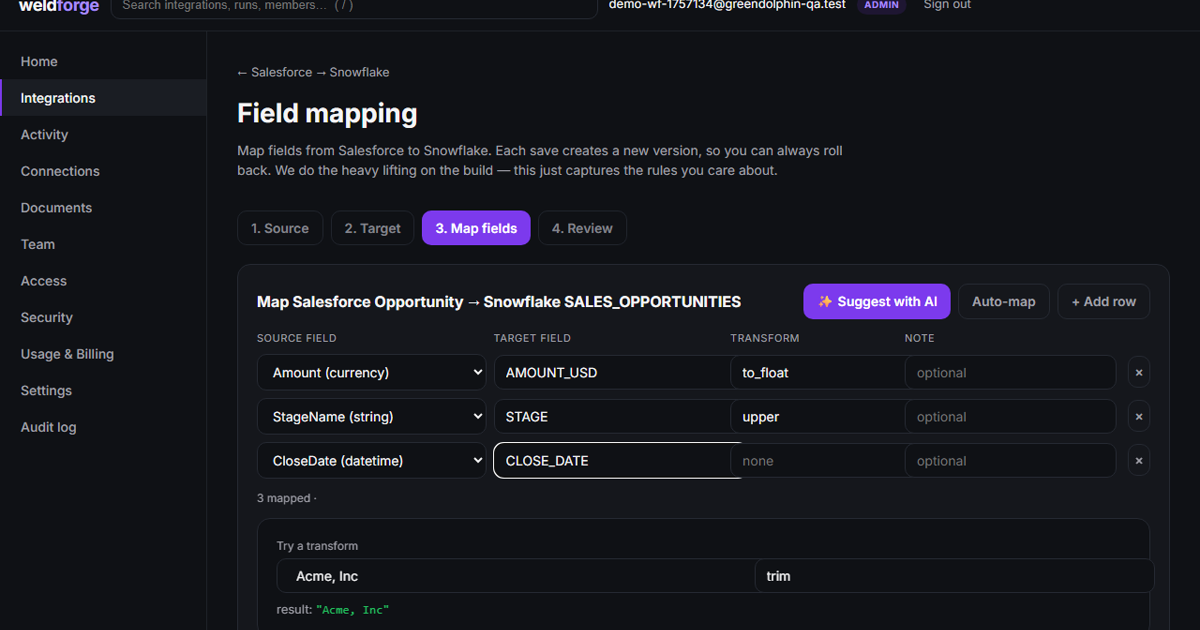
This is the model Weldforge is built on: you describe the outcome in plain language, our platform AI drafts the field-by-field mapping, and we build it, deploy it in our cloud, run it, and monitor it — for a flat monthly fee. There is no tool for your team to learn, no recipes to maintain, and no per-task meter. You review the mapping before anything runs; after that, operating it is our job, not yours.
How to choose
Four questions usually settle it:
- Do you have engineers who want to own integration as ongoing work? If not, rule out DIY and most iPaaS.
- Is this one-way into a warehouse, or do the systems need to act on each other? One-way favors ELT; two-way needs real integration.
- How predictable does the cost need to be? Per-task pricing punishes growth; a flat fee does not.
- Who carries the pager when it breaks? That is the hidden cost most comparisons skip.
Common pitfalls
- Underestimating maintenance — the build is 20% of the lifetime cost; keeping it running is the rest.
- Ignoring deletes and schema drift — fields get added and records get removed, and naive syncs silently rot.
- Flat-thinking the data — real records have line items and nested objects, not just top-level fields.
- No record-level filter — moving everything instead of only the records you mean to.
Popular integrations, explained
Each guide below covers what is typically synced and the real gotchas we handle for that specific pair.
Integration guides
The cheapest integration to build is rarely the cheapest to own. Decide who maintains it before you decide how to build it.
If you would rather skip the build entirely, describe what you want connected and we will draft the mapping and take it from there.